Systems
FAA-H-8083-31B Aviation Maintenance Technician Handbook Airframe
- Has good general systems stuff
Environmental
- PACK = Pneumatic Air Cycle Kit or Pressurization & Air Conditioning Kit, although lowercase "pack" in Bombardier parlance is just "package"
- ACM - Air Cycle Machine
General
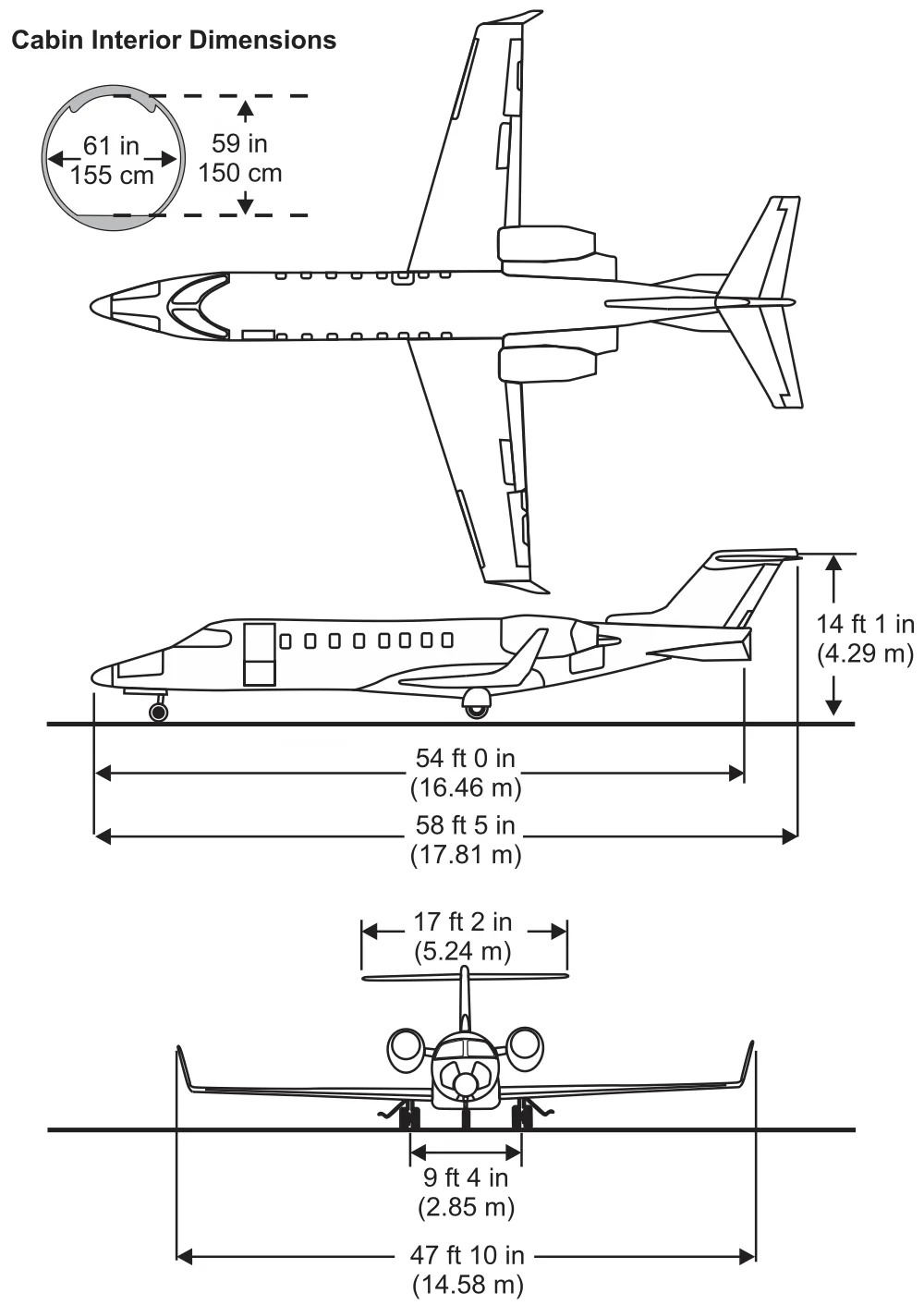
- Max Zero Fuel Weight is service-bulletin-based: we use 16,500 lb at CAE!
- CAE Learjet 45 are Code E (SB 45-11-4)
Overview
- Read through Quick Reference Handbook (QRH) -- all caps is CAS message
- White CAS = advisory status
- Master EICAS index = go/no-go
- Normal dark concept = normal flight is not illuminated
- MEL = list of stuff that can be broken
- Not in the MEL = required
Doors
- Entry door messages
- Red
ENTRY DOORCAS /ENTRY DOORCWP- Any latch pin is not fully engaged/extended
- Keylock locked from the outside with power on airplane
- Door circuit breaker (CB) popped
- White
ENTRY DOOR PINCAS- Door open and one or more pins not retracted
- Red
- Amber
EXTERNAL DOORSCAS- Either baggage compartment door or equipment bay door not closed
Seats
- To raise or lower the seat your inboard hand needs to grab center handle so outboard lever is naturally the one to raise and lower seat
- Up / Down = outboard
- Forward / backwards = inboard
- An eye reference locator is mounted on the windshield center post
Primary Flight Controls
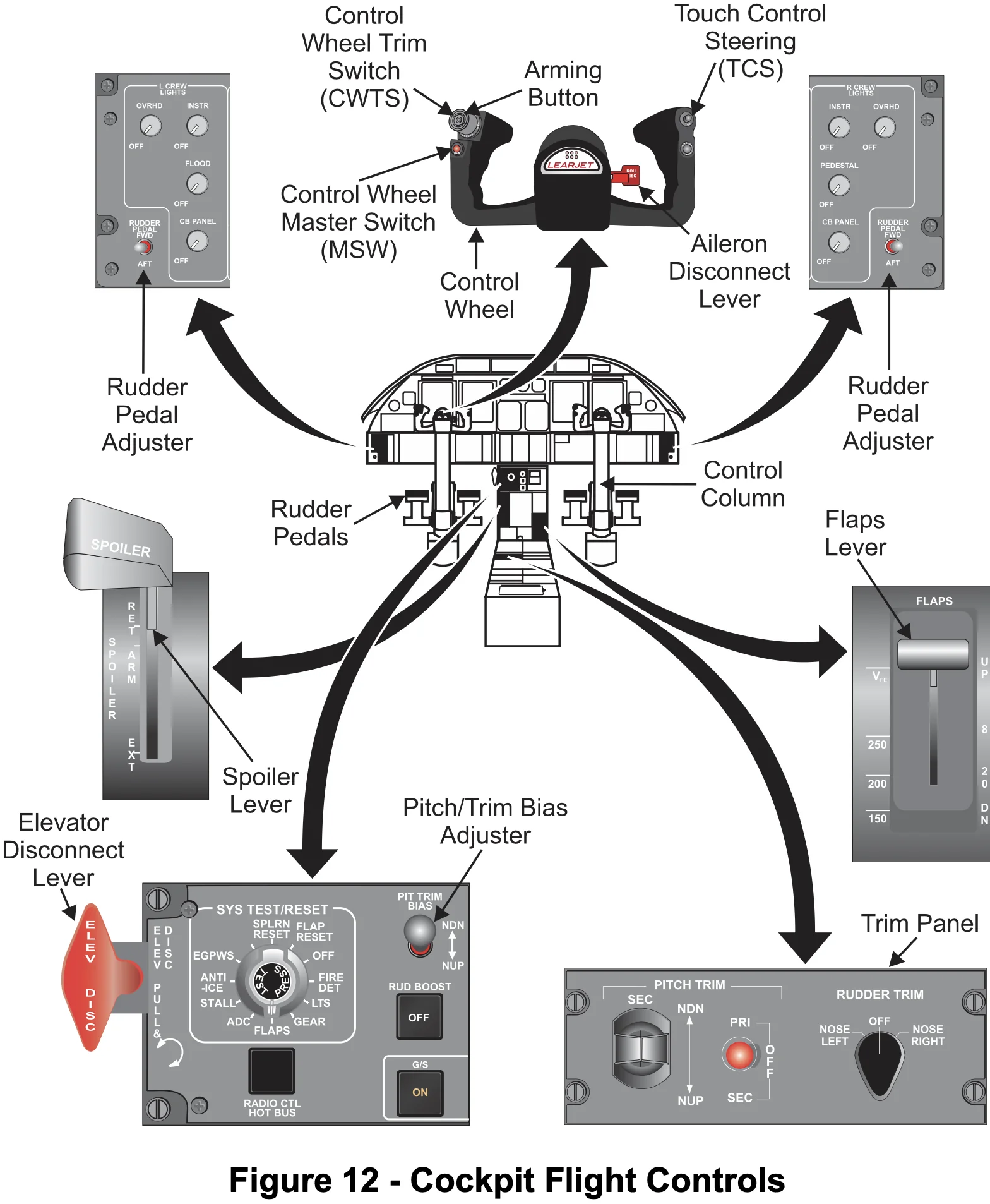
- Primary flight controls operated by cables, bellcranks, and pushrods.
- Aileron deflection is assisted by a mechanically operated balance tab on each aileron that progressively deflects as aileron deflection increases.
- The balance tabs deflect in the opposite direction of aileron movement.
- In case of aileron jamming, the pilot control wheel can be disconnected from the ailerons.
- Subsequent roll control by the pilot control wheel is accomplished exclusively by the spoilerons.
- "RUDDER PEDAL" Switch used to move rudders forward / aft.
- Control wheel deflection more than 5 degrees will activate the spoilerons.
- Note: in sim pressing MSW does NOT blow down spoilers
Secondary Flight Controls
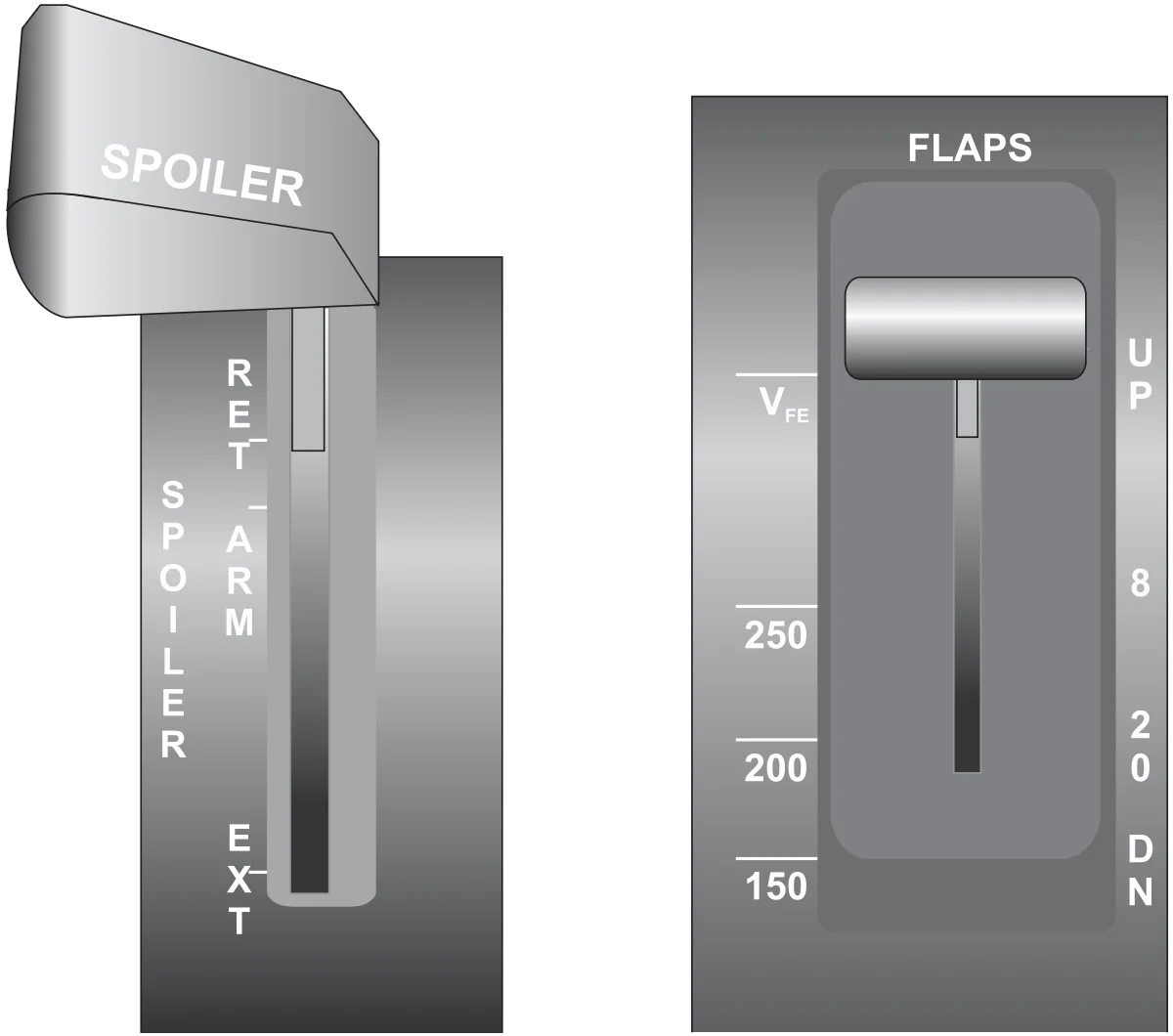
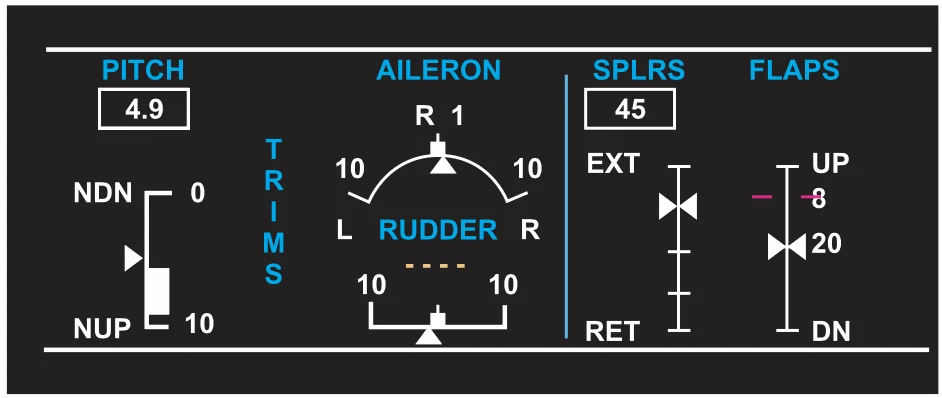
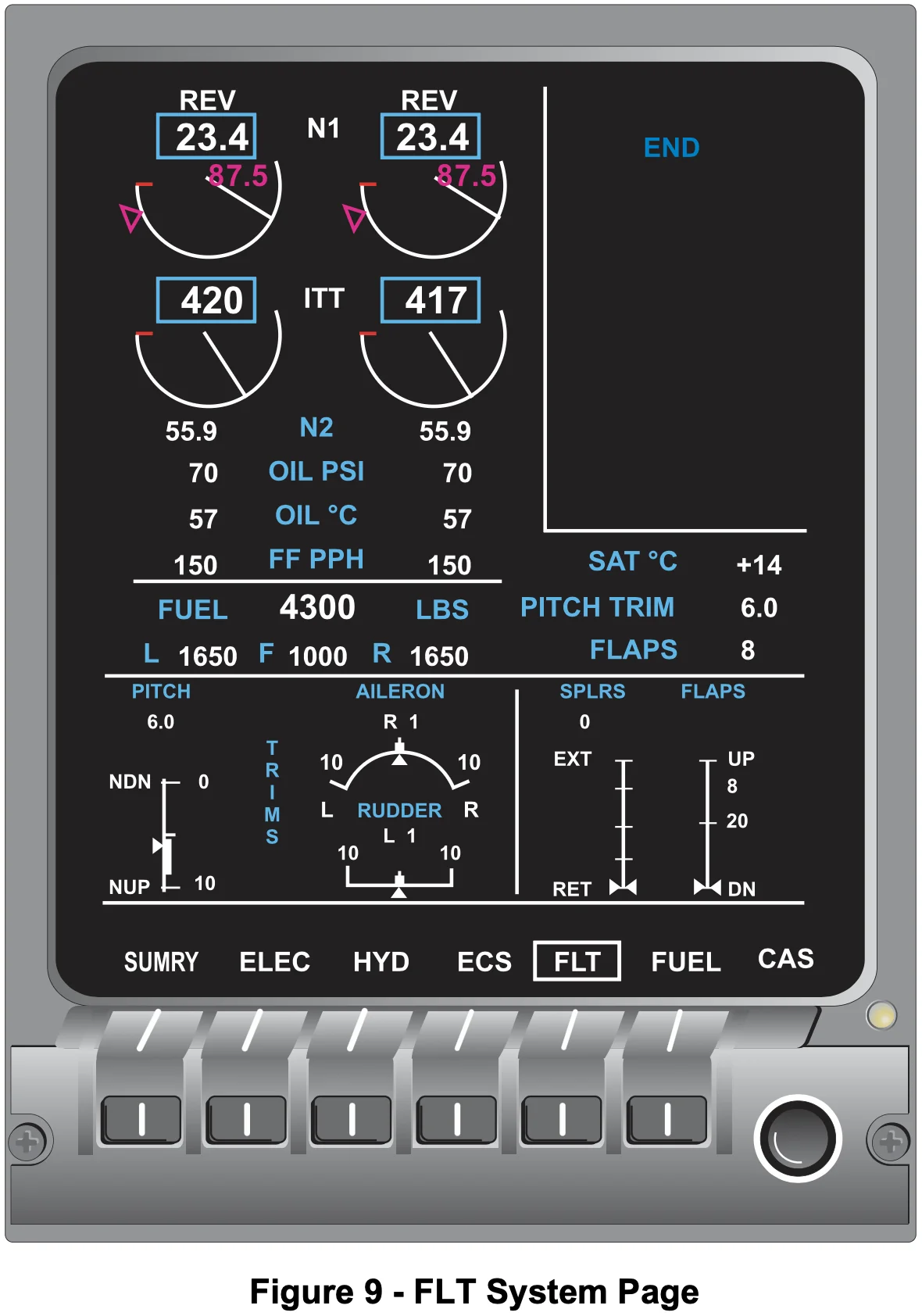
- Flap positions and VFE speeds
- 8° - 250 KIAS
- 20° - 200 KIAS
- 40° - 150 KIAS
- Spoilers extend up to 60°
- Limitations
- Below 35,000 ft
- Cannot have spoilers and flaps both extended
- Limitations
TIP
Do not extend flaps until below 200 kts -- because after flaps 8 you can't use spoilers -- below 200 can't use spoilers but can use flaps 20 and gear to slow down.
TIP
As soon as you go to flaps 8 is good time to arm spoilers (since can't use them anymore anyway).
- The secondary flight controls consist of hydraulically actuated spoiler/spoileron panels and flaps.
- Flaps
- Single slot fowler flaps
- The flaps consist of a single panel on each wing.
- The spoiler/spoileron panels assist the ailerons in roll control and also function as drag devices.
- There are no movable wing leading-edge devices.
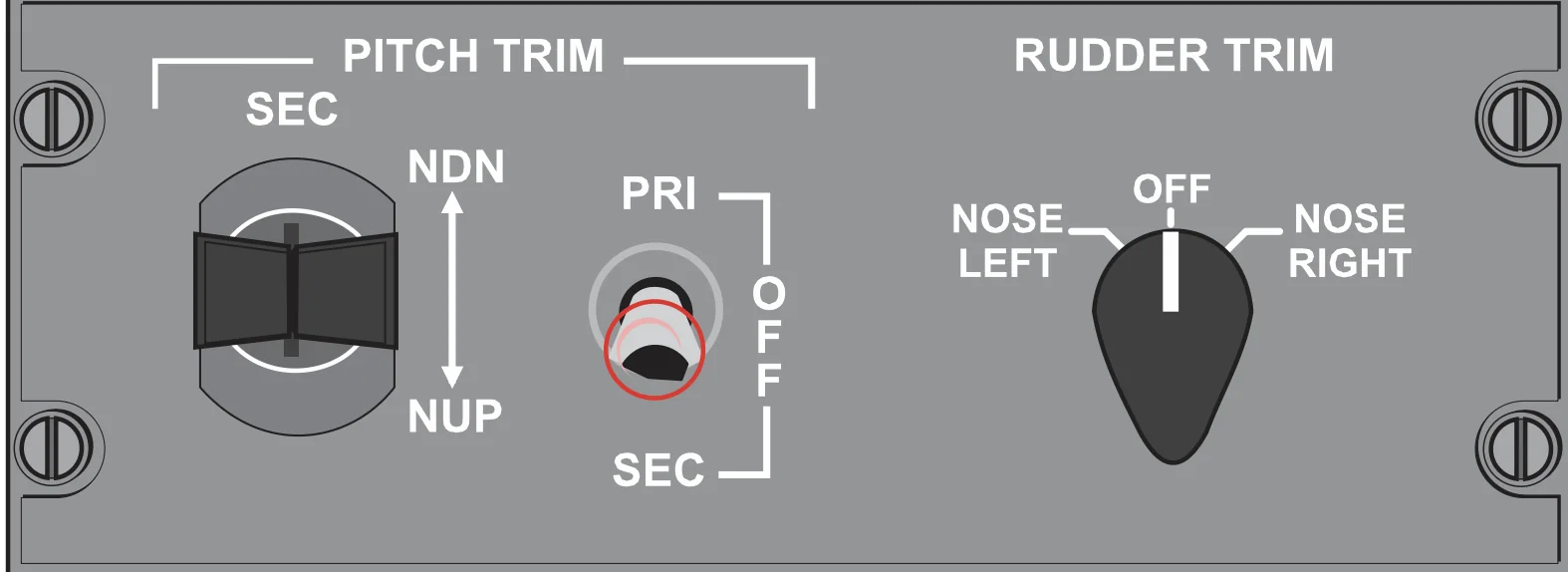
- Roll and yaw trim is controlled by conventional trim tabs while pitch trim is controlled by a variable-incidence horizontal stabilizer.
- In the "ARM" position spoilers automatically deploy under these conditions:
- Both squat switches are in the ground mode
- Both thrust levers are retarded to idle or cutoff position
- Wheel speed signal from each main gear is above 60 kt (from either wheel)
- Trim
- Primary / secondary trim -- just two separate motors but same jack screw
- Autopilot trims via secondary system
- Secondary system runs at a fixed slow rate
- So trim the plane before turning AP on
- Autopilot doesn't control rudder or aileron trim
Aerodynamic Features
- Stall strips
- Triangles
- Vortilons
Fuel System
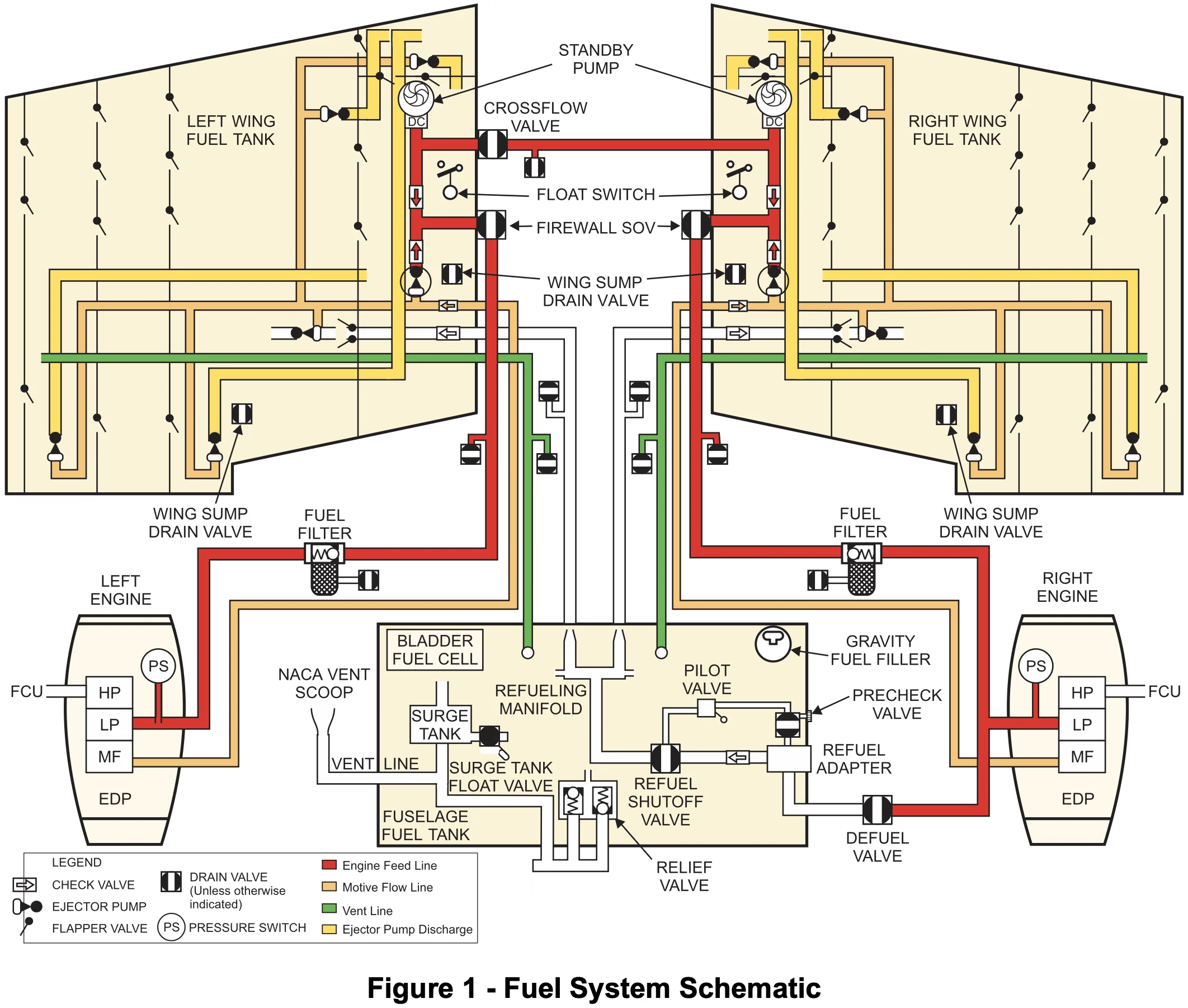
- The left standby pump transfer fuel from the left tank to the right tank
- RMU only shows wing quantities
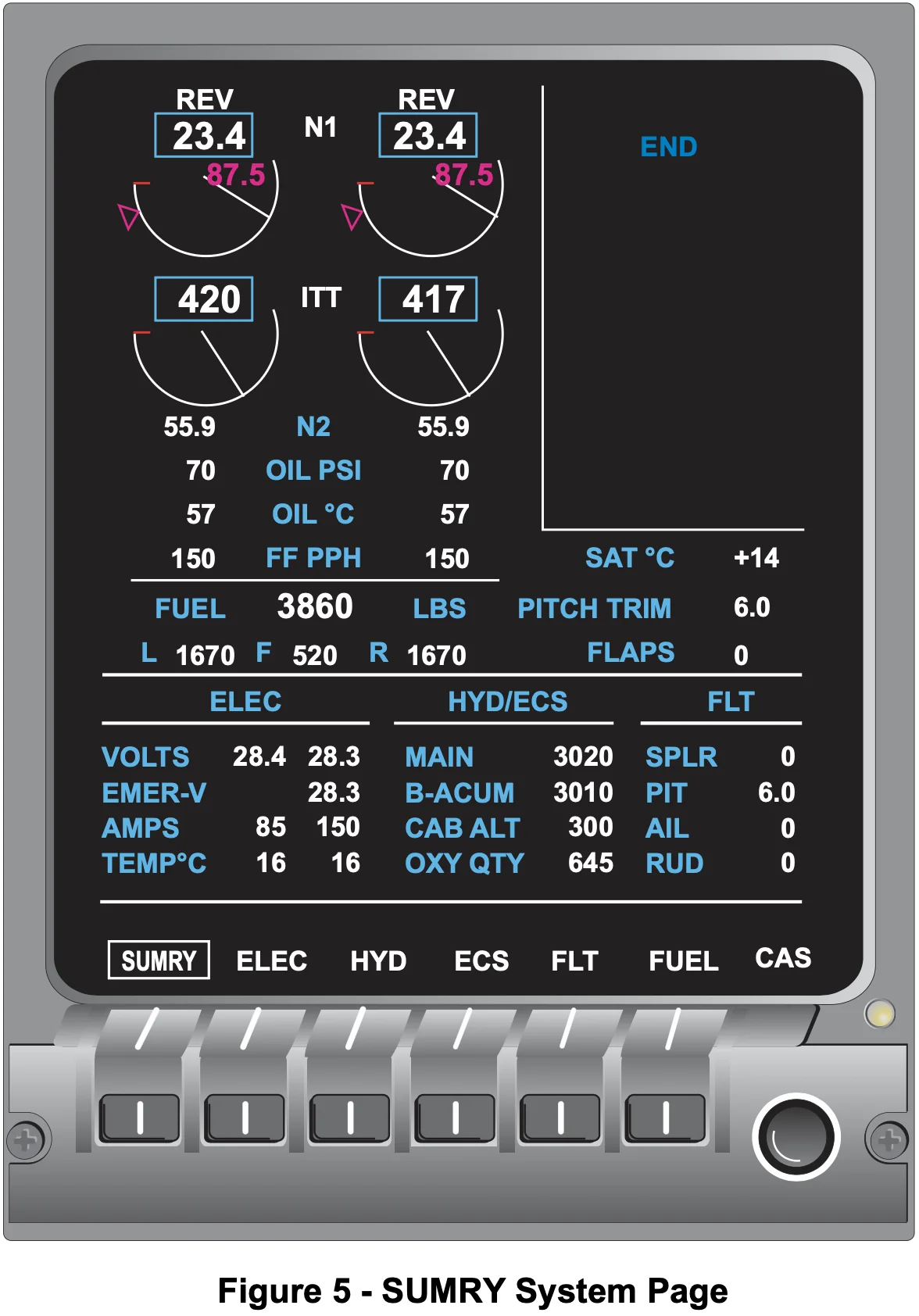
- Engine page only place to see fuel used
- Fuel used doesn't include APU fuel consumption
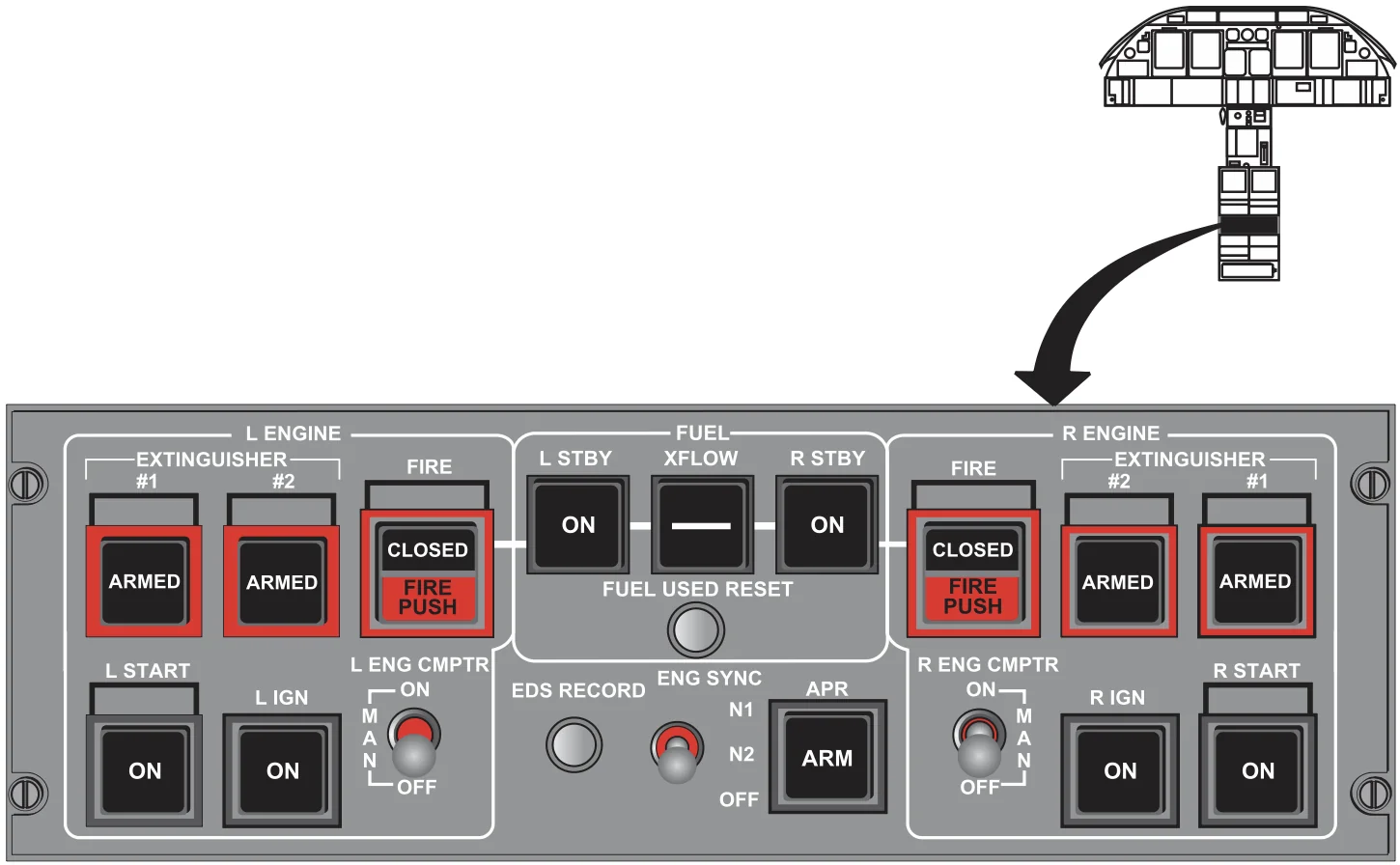
- Reset on engine button panel
- Wings are "wet" tanks open celled
- Fuselage is a bladder tank
- Rough fuel guide planning burn
- 2000 lb first hour
- 1000 lb every hour after that
- Approved fuels
- Jet A
- Jet A-1
- JP-5
- JP-8
- Are allowed to mix fuels
- See AFM Addendum I - Fuel Servicing about additives
- Max imbalance is 200 lb all phases of flight
- SB affects this, but at CAE its always 200 lb
- Single-Point Pressure Refueling (SPPR)
- Maintenance panel doesn't need to be on -- just tells how much is onboard, doesn't control anything
- On hot bus so don't need anything to be switched on
- SPPR coupling pre-check valve
- Minimum truck pressure is 20 psi
- Optimal 40, range 20-55 psi
- Test must stop in 20 seconds
- Flip switch for precheck valve
- Mini collector bay
- If test fails need to gravity fuel
- Pilot should watch line guys do this test
- If you don't do that test and fuel up, can overfuel and shoot fuel out NACA vent onto ramp
- SPPR stops a bit less than full, so gravity fuel if need to top off
- To defuel, left STBY pump on
- Defueling limited to -10 psi
CAS Messages
L/R/L R FUEL QTY LOWamber CAS- Fuel < 350 lb per side
L/R/L R FUEL BAY LOWwhite CAS- Low fuel in the collector bay
Hydraulic System
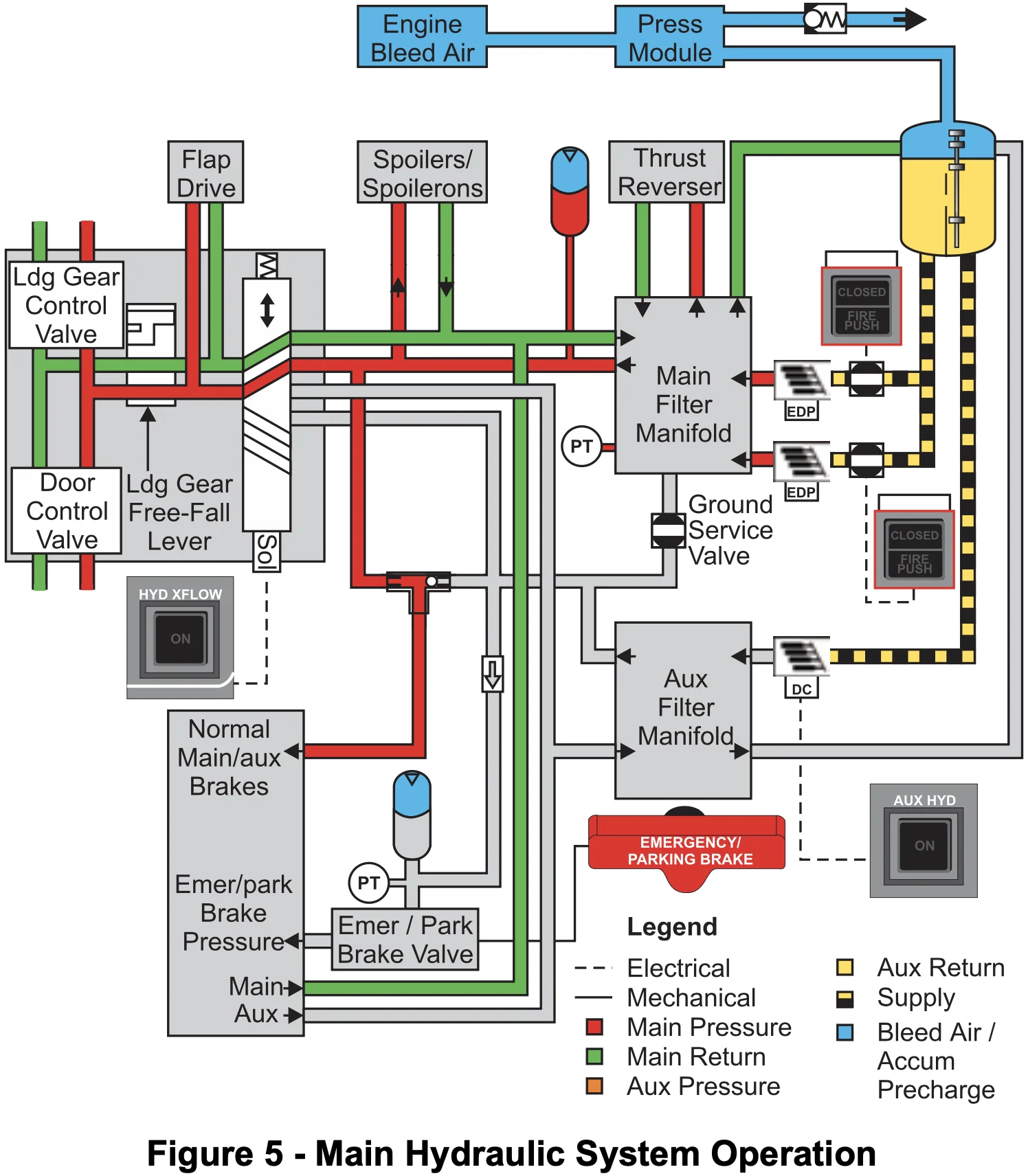
- 3000-psi hydraulic system
- Two independently operating systems (main and auxiliary), which share a common hydraulic reservoir and source of reservoir pressurization.
- Main hydraulic system uses two engine-driven pumps
- Either engine-driven pump is sufficient
- Auxiliary hydraulic system uses a DC motor-driven pump.
- Main hydraulic system uses two engine-driven pumps
- The reservoir is located forward of and above the tailcone baggage compartment and is pressurized by regulated engine bleed air.
- Make a backwards "h" on throttle quadrant (up to gear) to identify hydraulic systems
- Brakes
- Spoilers
- Thrust reversers
- Flaps
- Gear (and main gear doors)
- Anything above the wing can only be powered by engine driven pump
- Anything below the wing can be powered by either engine driven or AUX pump
- The auxiliary hydraulic pump is automatically controlled when moving the landing gear
- Memorize: MIL-H-5606 hydraulic fluid
- Alternate which engine you start first so you can get an indication of the hydraulic pressure from both left and right engines independently
- If the main and auxiliary hydraulic systems malfunction, a hydraulically charged pneumatic brake accumulator provides emergency braking.
- Main hydraulic system cannot charge brake accumulator.
- Can provide hydraulic pressure to everything else.
- Hydraulic failure scenario
- QRH start page A-50 Amber
MAIN HYD PRESSamber CAS => A-103- Main hydraulic pressure not in 1500 - 3800 psi limits
- Step 11. L & R IGN switches -- ON because potential no flap landing => higher pitch => potential compressor stall
- QRH start page A-50 Amber
TIP
Before putting the gear down, turn on the AUX pump first. Checklist doesn't say this, but it's good practice.
- The main hydraulic system has two identical engine-driven pumps, one located on each engine accessory gearbox.
- The pumps are a variable-volume, piston type that maintain a nominal system pressure of 3000 psi.
- The auxiliary system provides three basic functions:
- Hydraulic pressure to charge the brake accumulator
- Backup power for the flaps, landing gear, and wheel brakes if the main system malfunctions
- Power to operate hydraulic services via the main filter manifold during ground servicing
- The crossflow valve is used in conjunction with the auxiliary system to provide power to the flaps and landing gear.
- A brake system shuttle valve automatically moves to allow the hydraulic system with the highest pressure (main or auxiliary) to power the brakes.
- The accumulator provides at least six emergency brake applications or parking brake pressure for approximately 48 hours.
- The auxiliary pump operates on 28 volts DC controlled from the "L ESS BUS" and powered from the left generator bus.
CAS Messages
MAIN HYD QTY LOWwhite CAS- In flight means we probably have a leak
MAIN HYD PRESSamber CAS- Too high or too low below 1500 or above 3800 psi
Ice and Rain Protection
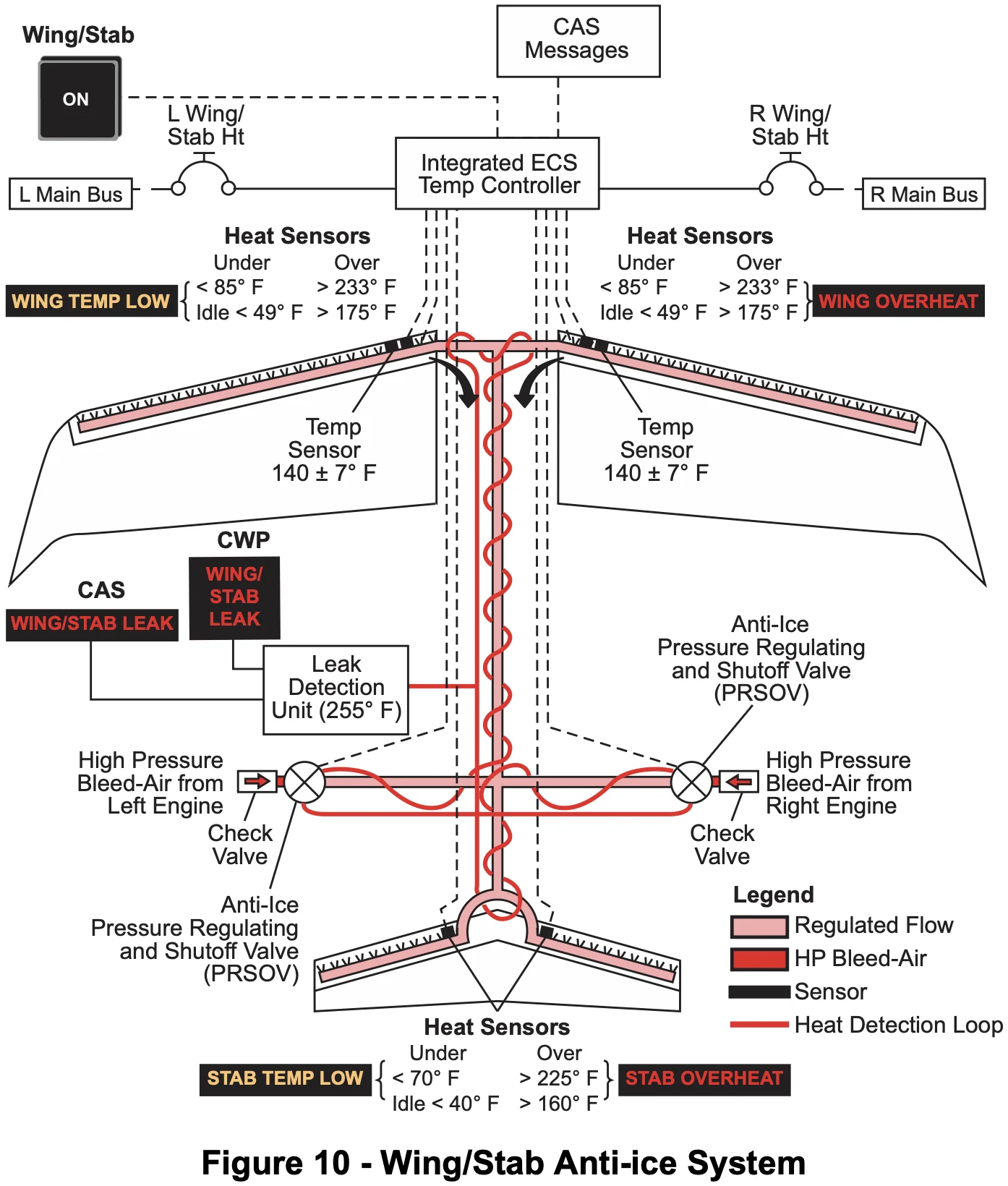
NOTE
The anti-ice systems must be turned on before icing conditions are encountered. Icing conditions exist when:
- Outside air temperature (OAT) on the ground and for takeoff is 10 °C (50 °F) or below, or the static air temperature (SAT) in flight is 10 °C to –40 °C (50 °F to –40 °F) and visible moisture in any form is present (such as clouds, fog with visibility of one mile or less, rain, snow, sleet, or ice crystals)
- OAT on the ground and for takeoff is 10 °C (50 °F) or below when operating on ramps, taxiways, or runways where surface snow, ice, standing water, or slush may be ingested by the engines or freeze on engines, nacelles, or engine sensor probes.
- Windshield heaters are AC powered
- Left alternator powers left side, right alternator powers right side
- Windshield heaters DC controlled temp between 70 and 125 °F
- ALD is "perfect" calculation => OLD is more realistic
Landing Gear and Brakes
- Landing gear is electrically controlled and hydraulically actuated
- Hydraulic to the gear is provided by the main hydraulic system
- The crossflow valve is used to use auxiliary hydraulic system for the landing gear (and flaps)
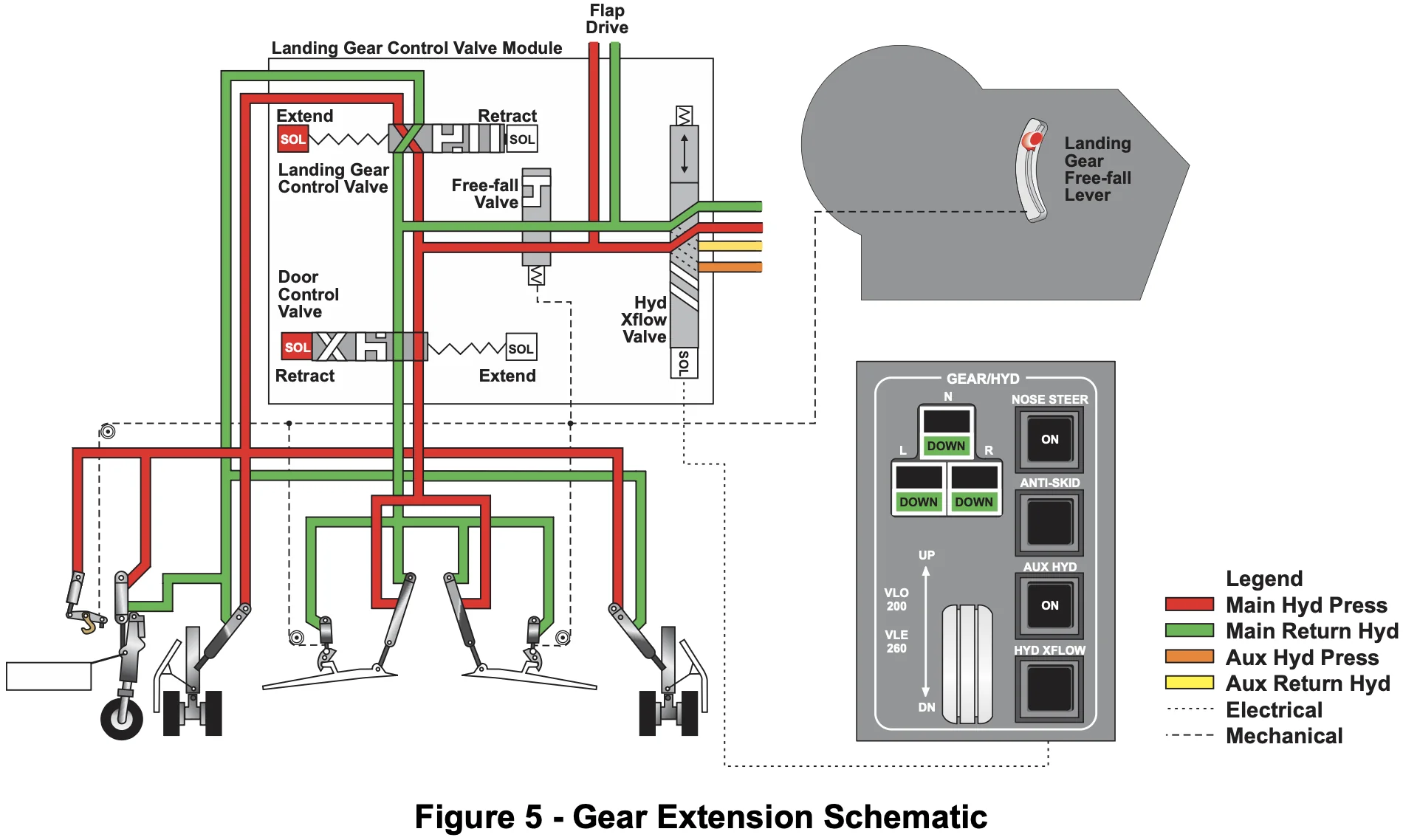
- VLO = 200 KIAS
- VLE = 260 KIAS
- TODO@dwiese - check this:
- The gear caution indications are activated when one of the following two situations exist:
- All of the following occur:
- One or more landing gear not down and locked
- Both thrust levers set less than MCR
- Airspeed below approximately 170 KIAS
- Altitude below approximately 14,500 ft
- Radio altimeter invalid
- Either of the following occurs when airspeed is greater than 210 KIAS:
- One or more landing gear in transition
- Either main gear door not up and locked
- All of the following occur:
- Gear caution (2 things)
- Any gear in transition and AS greater than 210 kts
- Any gear down and locked and
- Both thrust levers below MCR
- Nosewheel steering system (NWS) is electrically controlled and actuated.
- Steer-by-wire digital system
- At ground speeds less than 5 kt, the nosewheel may be turned to a maximum of 60° in either direction.
- As the ground speed increases to 70 kt, the maximum wheel deflection is progressively reduced to +/-7°.
- MSW -- press and release thrust idle if loss of control on ground -- disconnects nosewheel steering
- Indications that gear is down and locked
- Three green gear lights
- White in-transit lights extinguished
- No "GEAR" aural warning with flaps lowered beyond 25°
- ... and below MCR ... below 500' ?
- Taxi lights on
NOSE STEER ONlight indicates the nosewheel is down and locked
- Both main and nose gear limited to 165 kts
- Squat switches on mains
- Signals go to squat switch relay box to determine mode is in-flight or on-ground
- Cannot silence gear warning
- 25° or more flaps RA less than 500 ft
- Brakes are brake by wire
- Apply and HOLD brakes to get anti-skid
- If you pump brakes it will reset the anti-skid
- (Airspeed alive callout made at 40 KIAS)
- Can note this as indication of what speed we were at should we abort a takeoff and need to know which checklist step to follow
- Gear limitations
- Below 18,000 ft
APU
- (Learjet 40 does not have APU)
- Wait 30 seconds minimum after turning off APU to turn APU master off
- Basically wait until the right standby fuel pump (that was feeding fuel to the APU) automatically goes off
APU FAILamber CAS usually due to shutoff valve- So can't takeoff because don't want fuel going to APU in flight
- In mid-90s °F ambient temps APU will fail due to overheat, might be on for like 20 minutes before it overheats and shuts off
- APU burns 150 pph
- APU has its own dedicated fire bottle
- Gen amps pilot-side light knob turn up to see gen amps displayed
- TODO@dwiese -- which light knob?
- "APU FAIL / FAULT" light on the APU Maintenance Control Panel -- can fly, just no
APU FAILamber CAS- It's probably just a fault
- We can't service APU oil, so if low or add light is on, just call maintanence
- Limitations
- APU ground use only
- Tied to squat switches
- Can't run APU while getting deicing fluid or it will suck up deicing fluid
- Can't run APU while gravity fueling
- APU ground use only
Fire Protection
- 3 heat sensitive elements wired in series
- Fire loop 300 °F and 700 °F
- FIRE PUSH = shuts down fluids, air, and electrics
- Fluids
- Fuel
- Hydraulics
- Air
- Bleed air
- Electrics
- Generator
- Alternator
- Ignitors
- Thrust reversers
- Fluids
- Wait 15-20 seconds after firing one bottle before firing next so the ball valve can "reset"
- 400 - 800 psi is normal pressure on fire bottles
- Fire bottle discharge indicators
- Red -- thermal discharge (to prevent overpressure)
- Yellow -- fire bottle squib fired
Electrical System
- Sources of electricity: 6 total
- GPU
- Generators
- APU
- Alternator
- Main batteries
- Emergency battery
- Checklist options
- Set breaker in
- Reset
- Can reset once
- Pull
- AC system
- Windshield heat only -- left alternator = left windshield
- DC system
- Sims have 27 amp-hour Ni-Cad, lasts 30 minutes
- Emergency battery lasts 1 hour
- These drain concurrently
- So after main batteries drain, will have 30 minutes of emergency left
- Circuit breakers -- Red ring = emergency battery bus (powered by emergency battery)
- First thing when getting in plane = turn both batteries on at same time
- DU2 will power up, always powered off main batteries
- Wait minimum 5-8 seconds after turning on main batteries to turn on EMER BATT
- When DU2 powers up and everything stops flashing then can turn on EMER BATT
- Don't want to interrupt the ... self test because if you do we will deploy PAX oxygen masks
EXTERNAL POWERwhite CAS indicates that something is plugged in- But not necessarily that it is correct
- "AVAIL" on the "EXT PWR" electrical button means its within acceptable parameters
- Essential busses won't come online unless you have some kind of generator
- Electrical priority
- GPU
- Generators
- APU
- Normal operations it's a split bus system
- Bus tie should close automatically when on GPU or APU or single-generator operations
- Also any time we are starting the engines
- Basically not really a situation when we need to manually close BUS-TIE
- Most of the time its connected already because we are doing APU or GPU starts
- Non-essential bus is basically everything from behind the pilot seats backwards
- Dual gen failure (going through checklist)
- No memory items (only if dual gen failure AND battery failure)
- Lose non essential and main busses
- Bus-tie stays open -- left batt powers left side, right powers right side
- During checklist 2 -- electrical load: reduce -- Only check that mains and non essential busses turned off as they should
- DU2 is always powered by the main batteries, others are on avionics switch
- Make sure PF is ready to fly on standbys before killing their PFD
- Turn off windshield heat because they are DC controlled
- 16 - stanby pitot heat -- right probe switch off
Lighting
- Overhead lights are on hot bus
- When shutting down turn off until click
CAS Messages
- Amber CAS messages
L R BATT OVHT- Hotter than 60 °C
EMER BATT LOW- Taking charge > 10 AMPS ?
EMER BUS VOLTS- Less than 22 V or more than 29.6 V
L R ESS BUS VOLTS- Less than 22 V or more than 29.6 V
- White CAS messages
EXTERNAL POWERwhite CAS indicates that something is plugged in
Pneumatic System
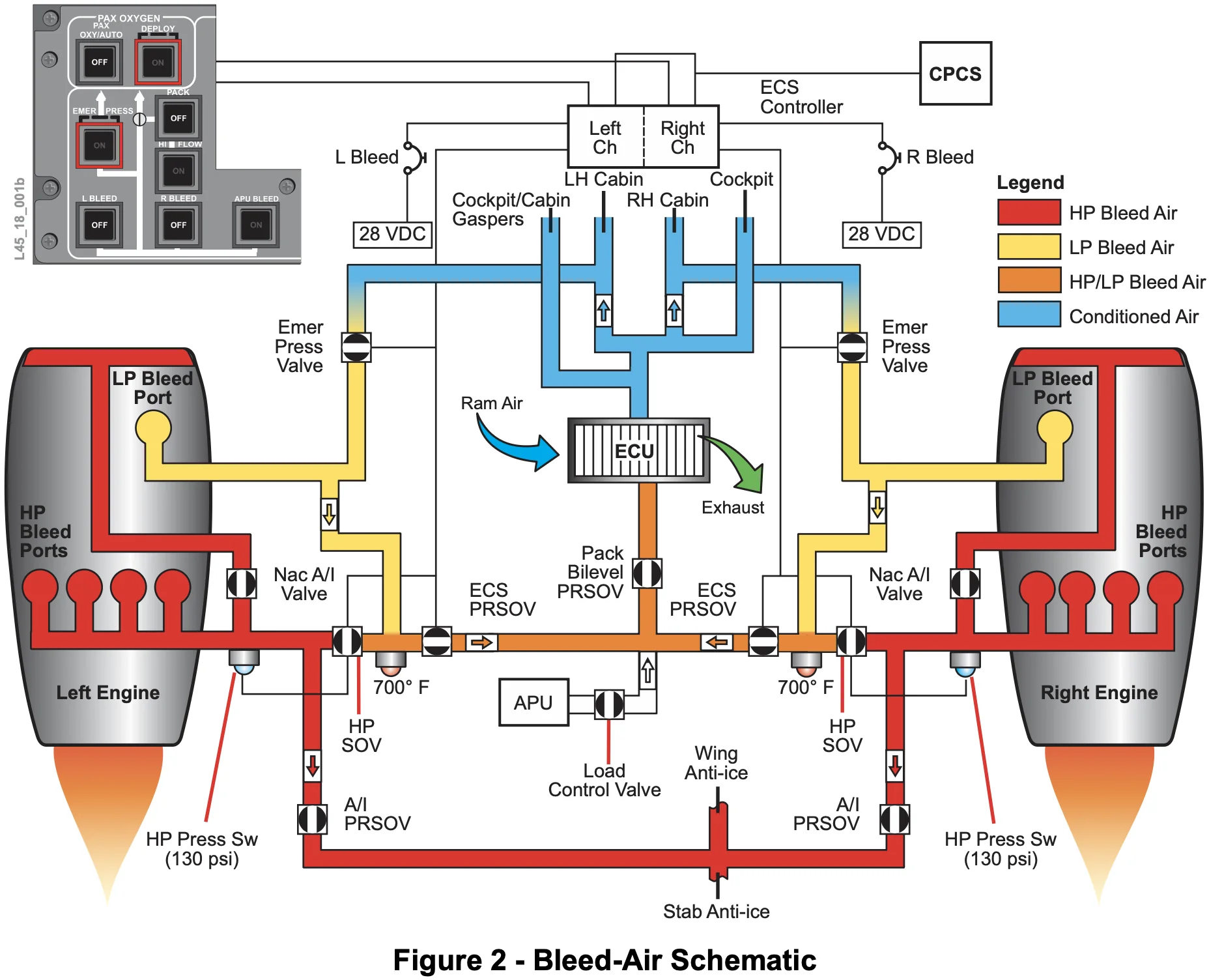
- Each engine can independently supply bleed air for the systems that require it.
- Two ways to get the "EMER PRESS" valves to open
- Manually -- press the button
- Automatically
- Over 9,500 feet cabin altitude (if in low-altitude setpoint)
- Over 14,500 feet cabin altitude (if in high-altitude setpoint)
- "EMER PRESS" routes LP unconditioned air into cabin -- hot air
- NAC valves fail open
- "HI FLOW" just gives pack higher pressure air
- Limitations (see AFM page 1-12) must be off when:
- TO power selected
- Landing
- Anti-ice operations
- Above 30,000 feet
- Limitations (see AFM page 1-12) must be off when:
- HP valves open when descending to maintain cabin pressure
- Anti-ice check is checking function of lots of valves
- Outflow valves max 13,700 or 9.7 delta P
- EMER power available = can control pressurization
- Need to do it manually?
- TODO@dwiese -- why?
- Max takeoff altitude 14,000
- Outflow valves in the FRONT of the aircraft
- When cabin smoke memory items -- this brings all the smoke up front into the cockpit
- Need generator or APU for heat in baggage compartment
- Keith AC on aircraft without APU
Pressurization Controller
- Memorize: Low altitude alerting setpoints
- See Pilot Training Guide page 7-15
- High altitude activation setpoints when both are true:
- Takeoff or landing elevation is set above 8000 ft
- The aircraft is below 24,500 ft.
- With the high altitude setpoints, the only things that will happen to prevent too high cabin altitude
- 13,700 feet cabin altitude - outflow valves will close to attempt to keep it from going higher
- 14,500 feet cabin altitude - PAX oxygen masks deploy
- Low altitude setpoints
- 8,750 feet cabin altitude (initial notification)
- Amber
CABIN ALTITUDECAS message
- Amber
- 9,500 feet cabin altitude (EMER PRESS to attempt to maintain pressure)
- EMER PRESS goes on
- Amber
LR EMER PRESS ONCAS message
- 10,000 feet cabin altitude (more severe warning of low cabin pressure)
- Red
CABIN ALTITUDE CASmessage
- Red
- 13,700 feet cabin altitude
- Outflow valves automatically close to attempt to retain pressure
- 14,500 feet cabin altitude
- PAX oxygen masks deploy
- Emergency lights come on
- 8,750 feet cabin altitude (initial notification)
Sort Me
- Pneumatic
- NAC valves fail open
- HP kicks on e.g. when descending and low thrust setting
- "EMER PRESS"
- Check -- turn on -- check
L R EMER PRESS ONamber CAS message -- back off
- Check -- turn on -- check
- Pressurization
- Normal cabin altitude is 9.4 delta P and 8,000 feet cabin altitude at 51,000 feet altitude
- Squat switches on ground = outflow valves open
- Red
CABIN ALTITUDECAS message is SB-based - 14,500 - masks drop AND emer lights come on
- DAU 1A FAIL can be losing information FROM pressurization controller, not the pressurization controller itself
- Emergency descent -- step 5 what is minimum altitude -- ask ATC e.g. for MVA -- also need altimeter setting
- Highly recommend turning AP back on once descending -- in case we pass out
Powerplant
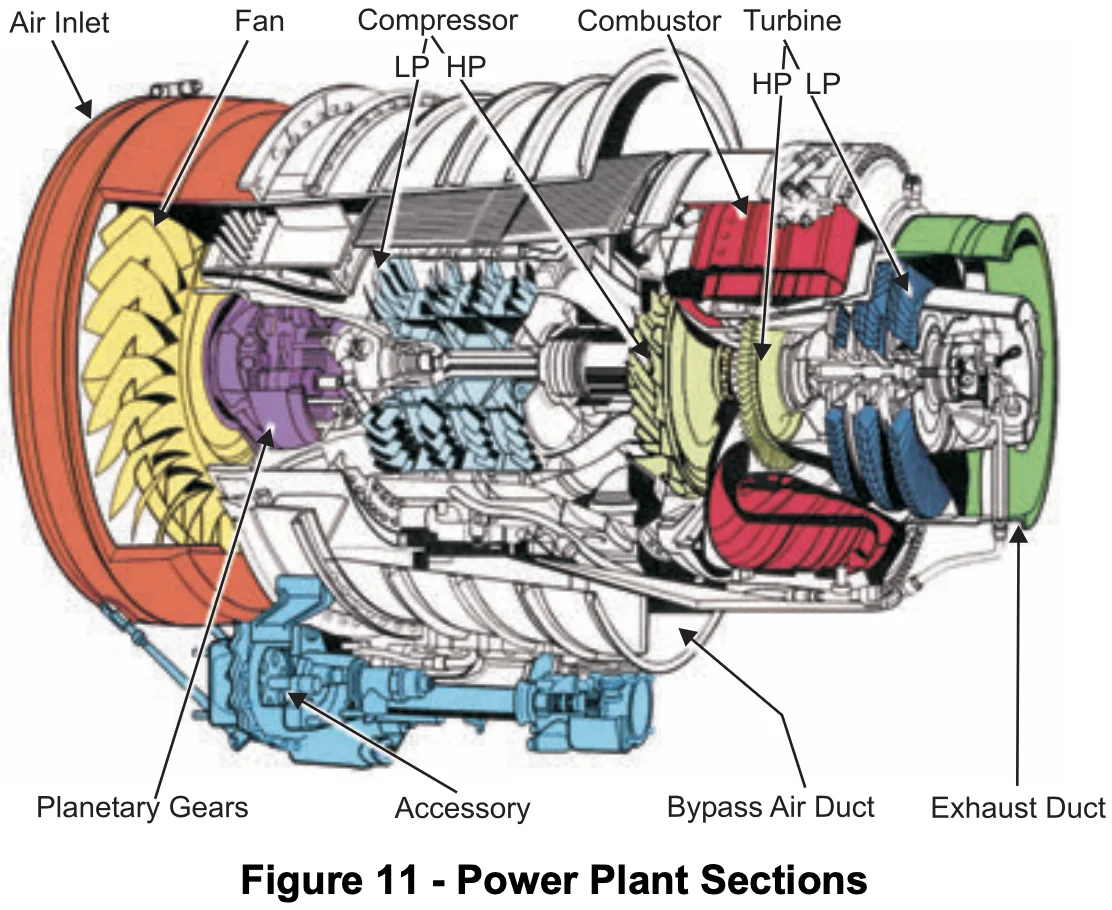
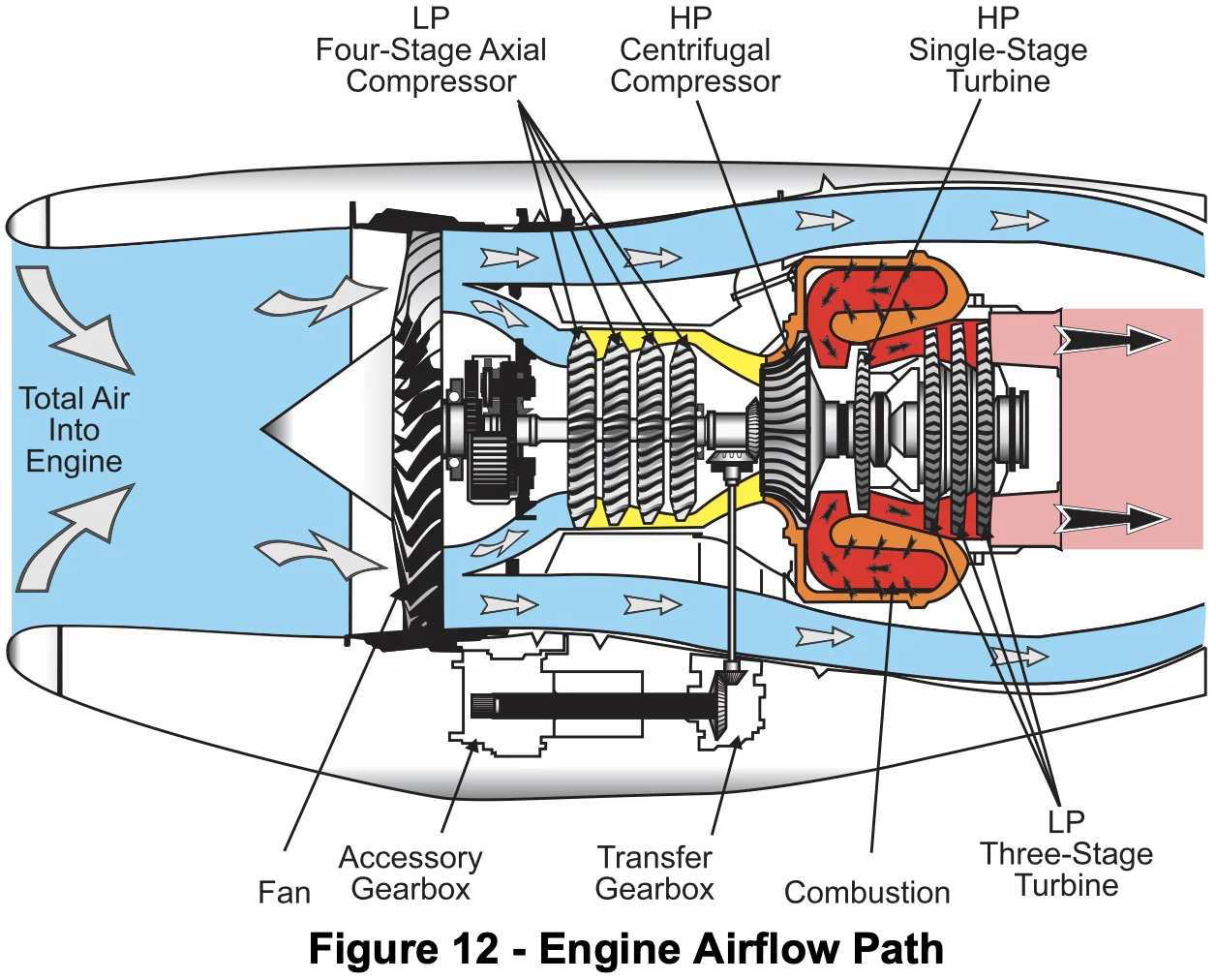
- Memorize: engine model number TFE-731-20AR (early) TFE-731-20BR (late)
- Engine overview (page 19-1)
- Early Learjet 45
- TFE-731-20AR
- 3,500 lb at SL up to 87 °F
- APR gives 150 lb extra thrust (page 19-25)
- Late Learjet 45
- TFE-731-20BR
- Same as above except temp is up to 103 °F
- Early Learjet 45
- Thrust levers mechanically connected to FCU
- DEEC controls the FCU
- The FCU is mounted on the fuel pump attached to the accessory gearbox (AGB)
- Engine Computer Toggle Switch (page 19-4)
- OFF / MAN / ON
- "ENG CMPTR" switch in the MAN position provides (page 19-23)
- Surge valve partially open (1/3 open)
- Fuel scheduling is controlled by the FCU
- Limits are controlled by the pilot (over-temperature protection not automatically available)
- Available for emergency use and maintenance troubleshooting
- Overspeed protection
- FCU has mechanical governor with 105% N2 limit
- 107% N1 and 109% N2 are hard limits, when those are exceeded engine will be shut down
- Should the mechanical overspeed protection fail, the DEEC activates the ultimate overspeed solenoid valve to a closed position at 107% N1 or 109% N2 and cuts off fuel flow to the engine.
- This feature works even when in the ENG CMPTR is in MAN mode.
- This feature is not functional if the applicable ENG CMPTR switch is in the OFF position.
- Engine sync
- We normally sync N1
- SYNC not approved
- T/O or landing
- Single engine ops
- The following components are driven by the accessory gearbox (AGB) (page 19-17)
- A Fat Horse Ate Donuts Outside
- A - AC alternator
- F - Fuel pump and fuel control unit (FCU) components
- H - Hydraulic pump
- A - Auxiliary motive fuel pump
- D - DC starter/generator
- O - Oil pressure and scavenge pumps
- A Fat Horse Ate Donuts Outside
- Oil
- Memorize: Type II Oil is what we use
- Check within 15 min (but hard limit 1 hour after shutdown)
- Otherwise need to start back up and stabilize and then check
- Note: these engines don't burn oil
- "APR ARMED" -- set this mode before takeoff
- In case of engine failure then DEEC will activate it automatically (e.g. when difference in N2, page 19-25)
- Ignitors
- Green IGN == both ignitors working
- White IGN == one ignitor working
- During start
- 45% N2 IGN light goes out
- 50% N2 starter light goes out
- If starter fails to disengage it turns amber -- starter engaged above 51%
- Should the starter remain engaged above 51% N2, the
STARTannunciator turns amber. (page 19-32) - Not a huge issue since starter is generator, it just won't act like a generator
- Thrust reversers
- Main squat switches in ground mode (page 19-36)
- Thrust IDLE
- Sort me
- Takeoff and APR thrust is limited to 5 minutes total
- Each of them are limited to 5 minutes, but if taking off with APR for 5 minutes, don't have another 5 minutes of TO thrust
- Starting 1 minute TOTAL?
- Takeoff and APR thrust is limited to 5 minutes total
- Memorize: 30 °C -- minimum temp we need before using the engines
- Until then thrust leversmust stay at IDLE
- Box goes away, now can start using thrust lever
- Pilot Training Guide 19-30
- Wait time after start attempt see "Starter Cooling Periods" (page 19-32)
- 1st = 1 minute
- 2nd = 2 minutes
- 3rd = 30 minutes
- Airstart
- Do not attempt an airstart following an engine failure which was accompanied by indications of internal engine damage or fire.
- Fire
- FOD
- Frozen
- Need ~60% N2 to do restart
- Do not attempt an airstart without an indication of N1 rotation. (AFM 4-21)
- Do not attempt an airstart following an engine failure which was accompanied by indications of internal engine damage or fire.
Engine Abnormals
- When doing manual mode governor check don't race through it
- Need to make sure we actually have control in manual mode
- Generally things we can't do anything about are white CAS messages
- e.g. fuel filter, turns to amber on ground
- Engine
SYNCgoing amber has nothing to do with gear down and locked- It turns amber based on gear selector position -- NOT the actual gear position from gear switches
- So if
SYNCis on with gear handle down it will be amber
- Wait until out of TO power before turning APR off
- In case losing an engine still want APR armed if at TO thrust
- No N1 bugs when in manual mode
- Thrust lever automatically comes back for autostow of thrust reverser
- "EDS RECORD" button records past 4 and next 1 minute for troubleshooting on ground
- Hung start nice continuous rise to 55% N2
- If it pauses or stops then CUTOFF
- Best glide 160 KIAS
- Note the big white line at 160 on standby ASI
- Any time we need TO or APR -- that is critical thrust situation
Thrust Reversers
- Limitations
- Ground only
- Max reverse at 40 KIAS or greater
- Not to be used on touch and go landings
- Prohibited for backing up
- Paved surfaces only
- Limited to idle reverse when engine is in MAN mode
Emergency Equipment
- Emergency equipment
- 3 fire extinguishers
- Under pilot seat
- Under copilot seat
- Lavatory
- Life jackets
- Behind crew seats
- Under passenger seats
- Lavatory
- Crash ax
- First aid kit
- Flashlights
- Smoke goggles
- Oxygen mask
- Smoke and mask -- same brand
- 3 fire extinguishers
- ELT -- make sure not to kick ON accidentally when getting out (switch on pedestal)
Oxygen System
- Green oxygen disk in nose - oxygen overpressure discharge
- If overpressure discharge occurs, the quantity indication on EICAS is three amber dashes (page 6-7)
- Oxygen quantity on EICAS doesn't mean oxygen is available because shutoff valve could be off
- Make sure no amber
OXYGEN OFFCAS message! - Quantity displayed in liters
- See oxygen duration chart
- Two ways to get pax ox control valve to open
- Manually with button
- Automatically if cabin alt over 14,500'
- Oxygen masks
- Puritan Bennett mask in SIM #1
- EROS mask in SIM #2
Limitations (Sort me)
- Water on runway
- A runway is considered to be wet when it has a shiny appearance due to a thin layer of water not exceeding 0.125 in. (3mm), but without significant areas of standing water.
- Maximum water / slush on runway is 0.75 in
- Limitations
- Paved only
- Max water depth 0.75 in
- Max demonstrated crosswind -- 22 kts (not limiting)
- Max tailwind 10 kts (is limiting)
Navigation and Communication
- TX buttons on outboard side
- SELCAL -- selective calling
- Left side should use NAV1 right side NAV2 -- otherwise needles will be yellow
- Press "NAV" button to cycle between NAV1 and NAV2 (Pilot Training Guide page 10-10)
- Same with FMS1 and FMS2
- CDH - its not its own radio, just another way of tuning com1 and nav1
- RMU is only RMU that receives power if both generators (and main batts?) fail?
- So it needs to be operative per MEL / Dispatch Deviation Guide
Flight Instruments
- Main batt on DU2 and RMU come on
- L Av master powers DU1 and ...
- R Av master ...
- DU controls are for their respective sides PFD
- FMS white needle
- NAV green needle
- Push on dimming knob to test
- MENU INOP = onside DU controller has failed -- you are stuck with whatever is displayed on the PFD
- DU2 controller -> PFD then DU3 will automatically become EICAS and we will lose MFD
- MFD is lowest priority display
- So if DU3 fails we do nothing
- IC-600 symbol generators (SG) create content on the screens
- Both independent FD
- Need both IC-600s working for autopilot to work (even though AP SW installed on IC-600 #2)
- IC/SG failure = two red X on same side
- Reversion panel always select OPERATIVE side
- On failed side can only control brightness, not content
- Any time EICAS cannot be displayed info goes on RMU1
- Top pitot-static probe is standby probe (image in the slides was mislabeled)
- Airspeed is 10 second trend vector
- Push on SPD knob on the flight guidance controller to switch between Airspeed and Mach
- When entering speeds in the MFD
- MFD -- SPDS
- Cycle until the speeds show magenta dashes (not amber dashes) it persists the speeds more better?
- Big box around V speeds on MFD means its being displayed on PFD
- Altitude trend vector is 6 seconds
- Simulated ground below 550 feet RA AGL
- ALT comparator alert +/- 200 feet difference
- Always use BARO mins (CAT I approaches only)
- RA/BARO button on PFD -- press it twice to get BARO mins
- Both sides have to display but only one side needs to set and it copies over
- VSI number only displays for +/- 500 FPM, but the arrow hand always shows
- ADC failure doesn't impact autopilot
- Ground initialization takes about 2 minutes wait for ATT FAIL and HDG FAIL
- AHRS failure = will lose autopilot
- BLUE SKY
- AHRS heading FREE -- if heading indicators don't match
- Make sure both pilot and copilot match and are correct
- WHEN IN HEADING MODE whatever direction spin heading bug is direction plane will turn
- DAU failure -- doesn't affect autopilot
- DAU failure = AMBER DASHES
- Don't mess with reversion switches yet -- GO TO QRH / AFM
- 1A and ... 2B? ... primary
- ... and ... secondary channels?
- Reversion panel top-to-bottom: to know whether you will you have autopilot use memory aid: NYNY
- IC600 -- No
- ADC -- Yes
- AHRS -- No
- DAU -- Yes
- Any time EICAS cannot be displayed RMU1 will automatically bring up "ENGINE PAGE"
- Can use navigation page backup on RMU
- RMU just receive info from other systems, if those systems fail then RMU can't display
- Note: when using standby altimeter without vibrator don't fly down to minimums
- Left avionics powers DU1 and DU2, right avionics powers DU3 and DU4
- DU controller -- controls info being displayed on on-side PFD
- AP ON and in a vertical mode ON -- will prevent overspeed
- If AP is not on the FD will indicate up to prevent overspeed?
- ALT comparator procedure
- Check standby
- Check altimeter setting
- Both sides have to turn on BARO mins
- Only one side needs to set them
- AHRS failure = BLUE SKY
- ATT2, MAG2 annunciator
- "Loss of pfd attitude or heading display" == AHRS failure
- Heading FREE / Slave
- Make sure pilot and copilot heading match
- Make sure they are both correct
- DAU reversion
- Important: ONLY REVERSION KNOB YOU NEED TO TO CHECKLIST TO RUN BEFORE TURNING THAT KNOB -- IT DEPENDS WHICH CAS MESSAGE YOU GET
- 1a 2b are primary
- 1b and 2a are secondary
- Important: WHEN RMU BACKUP NAV NEED TO RE SET THE COURSE ON THERE IT JUST DEFAULTS TO CURRENT HEADING
- RVSM - 29,000 and 41,000 inclusive
Crew Warning System
- CWP backup / parallel to red CAS messages
Autopilot
- AP TEST above ATT indicator
- Both IACs initiate a self-test sequence when the aircraft is powered up: an amber AP TEST is displayed on both PFDs
- Flight Guidance Control Panel -- press AP to engage
- Sec trim or button next to turn AP off
- YD good way to disconnect AP and YD
- AP button
- GA button
- Sequences to the missed approach
- Puts flight director at 9? degrees pitch
- Trimming
- Control MSW
- AP doesn't control aileron or rudder trim
- Do not press MSW to disconnect AP and YD because on the ground it also disconnects nose wheel steering -- bad habit
- Once off the ground just don't touch the rudder ever except if an engine is lost
- Arrow over PFD ATT indicator arrow needs to point to the side of the person who is flying (hit XFR button) that is what AP uses
- FD buttons are FD on buttons, can only turn it off on slave side when AP engaged
- Need a mode to turn FD back on
- When AP NOT engaged, PM pushes AP buttons at command of PF
- Generally when AP engaged PM only controls ASEL (altitude) knob
- Little green arc over ATT INDICATOR = low bank mode for heading mode (automatic above 41,600 ft MSL)
- Press "BNK" on flight guidance controller to manually select half bank mode
- Source versus Mode
- NAV SOURCE = 2 buttons, 1 source on each DU controller
- Equivalent of CDI?
- NAV MODE = on Flight Guidance Control Panel
- Autopilot selection
- NAV SOURCE = 2 buttons, 1 source on each DU controller
- 8 ways to manually turn off autopilot
- Note: AP turns amber, flashes, and disconnect tone for 2 seconds
- Pressing the AP button
- Pressing YD button
- Manually trimming
- Selecting pitch trim selector switch to
SEC TRIM
- Selecting pitch trim selector switch to
- Selecting pitch trim selector switch to
OFF
- Selecting pitch trim selector switch to
- Pressing GA button
- Selecting AHRS reversionary switch away from
NORM
- Selecting AHRS reversionary switch away from
- Depressing either Control Wheel Master Switch (CWMS) – emergency function
- Ways AP turns off automatically
- Note: AP turns red, flashes, disconnect tone continuously until cancelled by a CWMS
- Autopilot monitor detects a fault -or- autopilot pitch trim system detects a fault
- Loss of any power source to the autopilot
- Loss of servo power
- IAC/SG failure
- Loss of either attitude/heading system input
- Aircraft is at excessive attitude
- 35° bank
- 25° noseup
- 15° nosedown
- Either stick shaker activates
- Remember to silence cavalry charge with MSW switch!
- CAS
- AP AIL MISTRIM CAS
- Flight Guidance Controller XFR button
- FD1 and FD2 buttons -- think of them as "off" buttons
FMS
- Universal UNS-1E(W?) -- what we have in the sim (the dual FMS)
- Need approach level of service to arm the approach
- If don't see it can't continue down past FAF
- Don't use joystick
- "M" means menu options are available
- "I" at the top means FMS are independent
- Will stay that way until ACCEPT database on both
- Always put a number in the CARBO line even if it is 0
- When fuel onboard is selected and hit "Back" it pulls from EICAS total
- DO NOT DELETE THE NO LINK IF IT IS PAST YOUR CLEARANCE LIMIT
- Asterisk on either side indicates it's not a waypoint e.g. RNAV 22 Y (just saying approach is next) EOA (end of approach) label
- Don't delete anything within approach or it deletes whole thing
- "LIST" button to load airways
- "AIR" on the right side
- Make sure WAAS channel ID matches approach plate
- UNS-1E does continual RAIM check
- FPL -> MENU -> RAIM CHECK on right side
- Recommendation: when TOD go into RAIM PREDICTION menu and want to see "APPR" all the way down
- Don't do if you see "TERM" or "ENR" (whatever the spelling is)
- GA button sequences us on missed approach
- Holds: select MNVR on right side
- "MANOEUVER" -- is this how the menu is really spelled?!
- MFD does not draw holds
- If you make FPL changes BEFORE in hold it will blow away the hold
- Once in the hold can delete the entire flight plan and hold will stay there forever
- PVOR = pseudo-VOR
- Temperature compensation assumes negative temp
- Put in minimums in altitude
- Temperature compensated has "T" by it
- Waypoint is fly-over if it has an asterisk next to it
- Command intercept
- Smart turn
- Or ask to go direct to fix
- Or manually use heading bug to turn and intercept
- Using VNAV
- Set bottom altitude / whatever cleared to on ASEL
- FMS select VNAV -- FMS will show target descent
- Flight guidance control -- select "VNV"
- After landing the FMS shows a landing page with info
- Take a picture of it
- Once you navigate off the screen cannot get info back
Weather Radar
- Primus 660 Radar
- Use RCT on always -- shadow where radar can't see
- Use TGT always also
- Default leave Radar in "SBY" mode
- Tilt 2-3 degrees is good starting point
- Large yellow band in the back is us looking at the ground
- 120 deg 4 seconds vs 60 deg per 3 seconds with "SECT" button on Primus 660 radar panel
- Leave GAIN pushed in for auto gain
TCAS
- Normal / Above / Below modes
- On RMU TCAS make sure set to AUTO
- On RMU set REL altitude for targets
- Pitch in the green, stay out of the red
- ALWAYS COMPLY WITH RA
- Systems are talking to each other between two planes
- When in TA only mode it tells the other plane we can't respond to RAs